Airport transfer booking that follows the flight
Airport work lives and dies on timing. Chauffeur Plugin tracks each arriving flight, moves the pickup when it lands late, and gives your chauffeur the terminal, gate and a full-screen name sign.
In short
Chauffeur Plugin is an airport transfer booking system for WordPress. Clients enter their flight number and the pickup follows the flight: when it lands late the pickup moves and the chauffeur, your office and the client are told. Fixed airport prices, airport fees, airports as Popular locations, free waiting time and a full-screen name sign are built in. One yearly licence, no commission.
The problem
What slows operators down
Late flights, unpaid waiting
Chauffeurs wait for delayed flights while the next job slips.
Wrong terminal
Half-typed addresses send cars to the wrong side of the airport.
Price per airport run
Clients expect a fixed price to downtown, not a meter.
How Chauffeur Plugin helps
Built into WordPress for airport transfers
- Flight trackingPickups move with late arrivals; cancelled or diverted flights are flagged red.
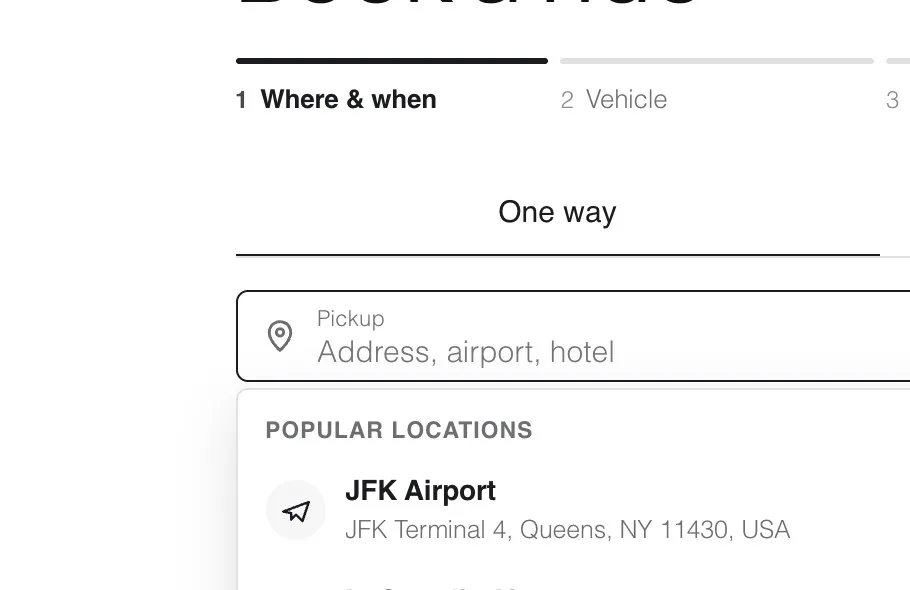
- Popular locationsEach terminal as a one-tap choice, before the client types.
- Pricing engineFixed airport routes per vehicle class, airport fees inside airport zones.
- Driver appTerminal, gate and baggage belt in the app, plus a full-screen name sign.
- NotificationsDelay, landed and on-the-way messages go to the right people automatically.
- Languages and privacyInternational travellers book in seven languages; each booking keeps its language.
How it works
How a booking works, start to finish
- 01
Airport in one tap
The airport appears first in the pickup field as a Popular location.
- 02
Flight number at booking
The form asks for it when the pickup is an airport.
- 03
The flight is watched
From the day before until it lands, more often as landing gets close.
- 04
The pickup moves
Late by 15 minutes or more? The pickup moves by the same amount, before the chauffeur sets off.
- 05
Meet and greet
Terminal and belt in the driver app; a full-screen name sign with your logo.
Set it up
The settings that matter for this work
Each one links to a step-by-step guide in the Help Center.
One licence, no add-ons
Everything included, from day one
No modules to buy, no higher tier to unlock, no fee per vehicle or booking.
- Booking form with instant prices
- Quick form for your home page
- Distance, hourly, zone and tour pricing
- Pricing rules, extras, fees and promo codes
- Stripe, Square, PayPal, Mollie and cash
- Deposits and charges after the trip
- Dispatch board and driver app
- Flight tracking and name sign
- Live tracking link for clients
- Email, SMS, WhatsApp and Telegram
- Company accounts and PDF invoices
- Reviews, reports and CSV exports
- AI booking assistant
- Seven booking form languages
- Partners and farm-out
Do the maths
What you keep by switching
Enter what you pay today for booking software. One licence covers your website with every feature and no commission.
Monthly limo platforms commonly charge about $99 to $199 a month, some with a fee per booking or vehicle. Google Maps and payment-provider fees are paid either way, so they are left out.
Your software costs now
$1,788 a year
Chauffeur Plugin, every feature, no add-ons
$89.99 a year
You keep
$1,698
a year, or $5,094 over three years
Is it right for me?
What operators ask before they switch
I'm not technical.
If you can edit a page in WordPress, you can set it up. A ten-minute setup guide and a Help Center guide for every setting walk you through it.
I already use other software.
Try it free for 14 days next to your current system, on a staging copy if you like. Switch when you're happy; nothing to cancel otherwise.
Will it work with my theme?
Yes. The forms keep their own layout in any theme, take your font and colours, and work with blocks, Elementor or shortcodes.
What does it really cost?
One licence per website, from $89.99 a year or $249.99 once, with every feature. You pay Google Maps and your payment or SMS provider directly, at their rates.
Where is my data?
In your own WordPress database. Bookings and clients never pass through our servers.
What if I need help?
Contact us and we reply within one business day. There's a 14-day money-back guarantee after you buy.
How does flight tracking move the pickup?
When an arriving flight is late by at least your threshold (15 minutes by default), the pickup moves by the same amount, always counted from the original booked time, until the chauffeur taps On my way.
Can I charge a fixed price from the airport?
Yes. Draw the airport and your service zones, then set a fixed route price per vehicle class. It replaces the distance fare for those trips.
Which flight data service does it use?
AeroDataBox, through RapidAPI or API.market, with your own account. A trip uses about 10 to 15 lookups, and lookups stop once the flight lands.
What if the flight is cancelled or diverted?
It is flagged red and announced to your office. The pickup stays as booked so you can sort it out with the client.
Does the pickup move when the flight is early?
Only if you allow it under Settings → Integrations → Flight tracking. By default only late arrivals move the pickup.
Can I charge for waiting at the airport?
Yes. Set the free waiting time for airports and a price per minute. The chauffeur logs the minutes and you approve and collect the charge.
Are departures tracked too?
Clients flying out are watched, never moved: the pickup time for a drop-off at the airport stays as booked.
Do I need to buy add-ons?
No. Every feature on this page is included in every licence and available as soon as you activate the plugin. You only pay outside services you choose, such as Google Maps or an SMS provider, directly.
Start taking airport transfers bookings on your site
Try every feature free for 14 days. No card needed, no commission on your bookings, ever.