Your whole car service, in one WordPress plugin
An online booking form with instant quotes, a pricing engine, payments, a dispatch board, a driver app, flight tracking, notifications, company accounts, invoices and reports. Every capability below, with real screenshots.
Take bookings
Booking form
A booking form clients finish in under a minute
Clients choose one way, by the hour or a tour, see every vehicle with its full price, and book. On your own website, in your colours, on any device.
- Four short steps: where and when, vehicle, details, book
- Quick form for your home page that hands the trip to the full form
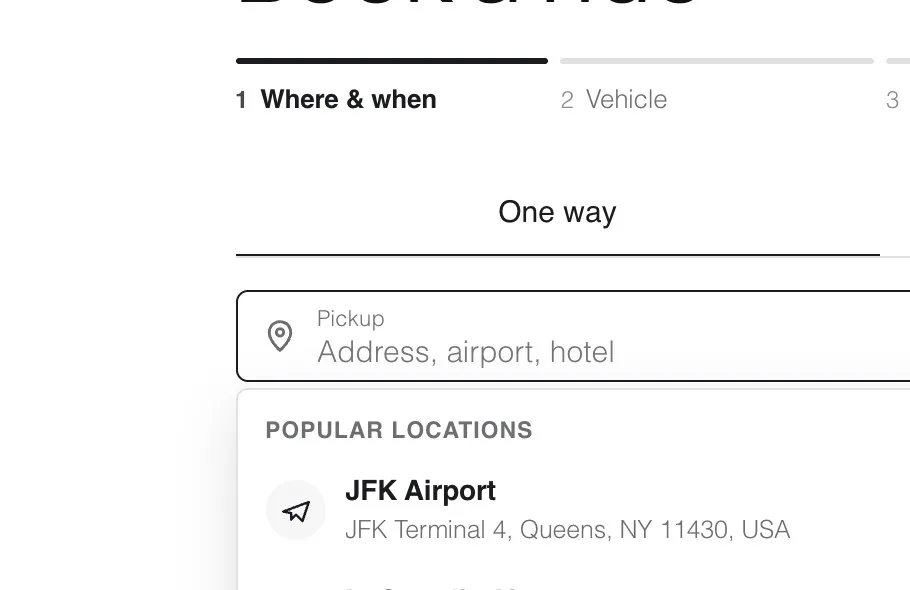
- Popular locations: airports, cruise terminals and hotels before anyone types
- Guest checkout, or sign-in with a one-time email link (no passwords)
- Return trips, extra stops, several cars in one booking
- Unfinished bookings are saved and clients get one reminder email
- Light, dark or automatic colours, five ready-made looks
- English, Spanish, German, Dutch, Portuguese, Italian and French
- Accessible: keyboard and screen-reader friendly (WCAG 2.1 AA)
- Block, Elementor widget or shortcode, in any theme
The form is mobile-first and keeps every answer when clients go back a step. Address suggestions come from Google Maps and are limited to the countries you serve, so a typed address can never slip outside your area.
Add it with a block, an Elementor widget or a shortcode. It inherits your theme's font, and five ready-made looks (from Neutral Light to Classic Gold) set the colours in one click. Button text switches between dark and white by itself so it always stays readable on your accent colour.


Quick form for your home page
Drop it into your hero. Clients enter pickup, drop-off, date, time, passengers and luggage, press See prices and land on step two of the full form with everything filled in.

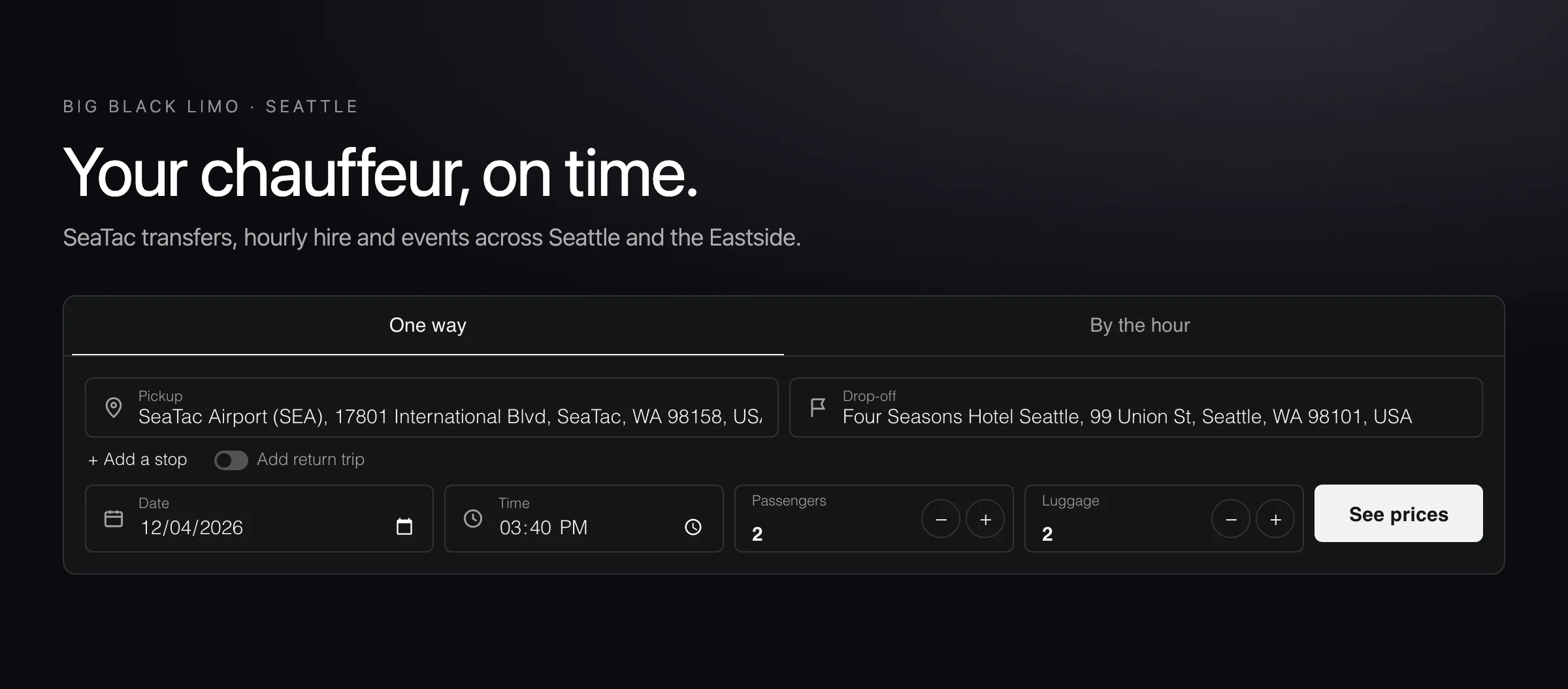
Add it in one of three ways
- Block editor: the Chauffeur Plugin — Quick form block
- Elementor: the Quick booking form widget
- Any builder or theme: a shortcode
[chauffeur_quick_form theme="dark" layout="horizontal"]| Option | What it does |
|---|---|
| theme | light, dark, or auto to follow the visitor's system setting |
| layout | horizontal for a wide hero, stacked for a sidebar or narrow column |
| services | which tabs to show: p2p (one way), hourly, tours |
| default | the tab that opens first |
| redirect | the page with the full booking form, if it is not the default one |
| lang | the form language for this page, e.g. es or de |
Popular locations
Airports and cruise terminals, one tap away
Add the places your clients use most. They appear first in every pickup, stop and drop-off field, with an icon for each type, before the client types a single letter.
- Airports, cruise terminals, train stations, hotels and venues
- Typing filters them; Google suggestions follow below
- Up to 30 places, in the order you choose
- Airport fees still apply automatically
For airport transfer companies this removes the most common booking mistake: the wrong terminal or a half-typed address. It also works without a Google Maps browser key.

Pricing engine
Prices that follow your rate card, not a guess
Every quote is built the same way, from your rates, and you can see every line in the booking. Clients see one clear total or the separate lines, as you prefer.
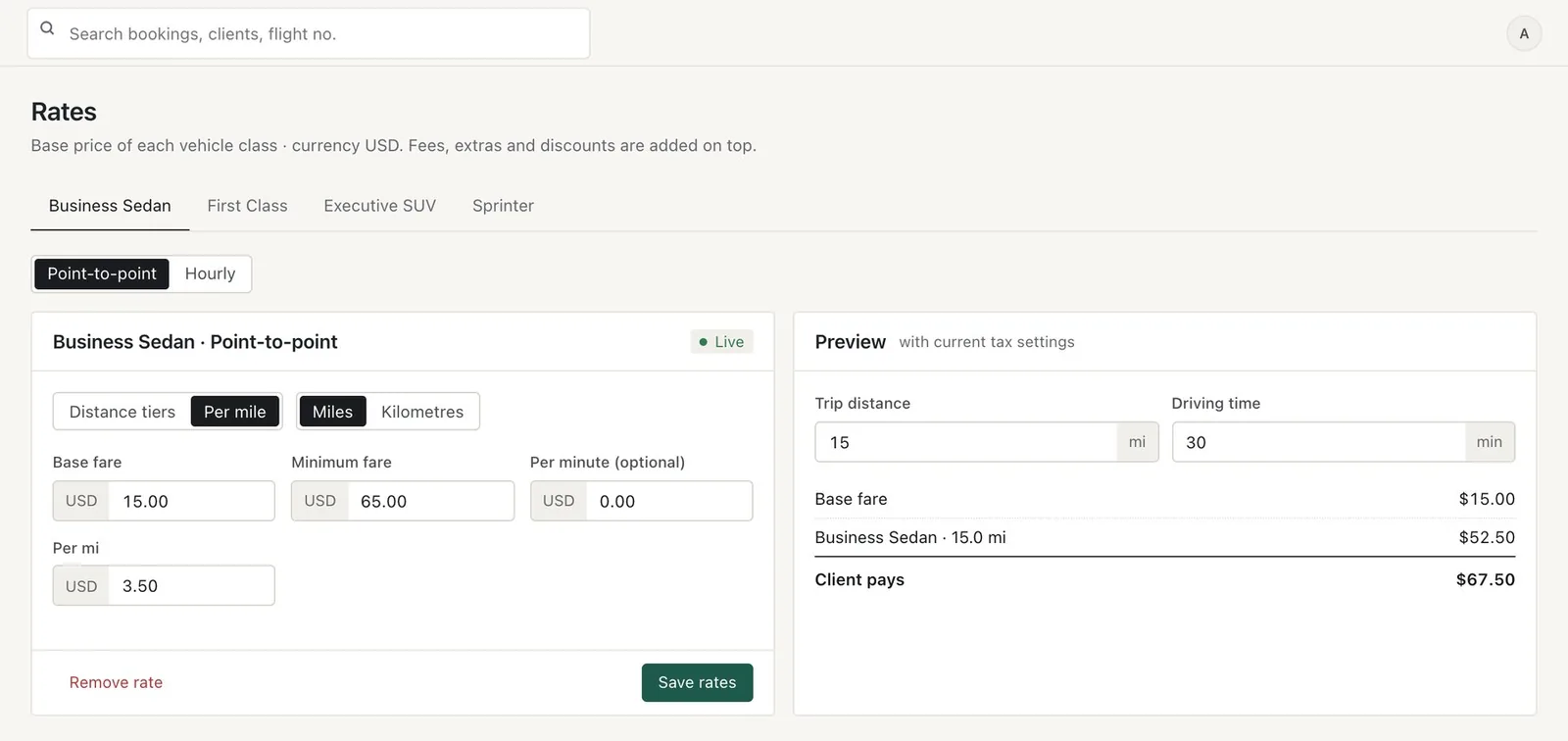
- Per mile or km, with cheaper rates for longer distances
- Hourly with a minimum number of hours
- Zones and fixed routes, such as Airport to Downtown
- Tours with one price per vehicle class
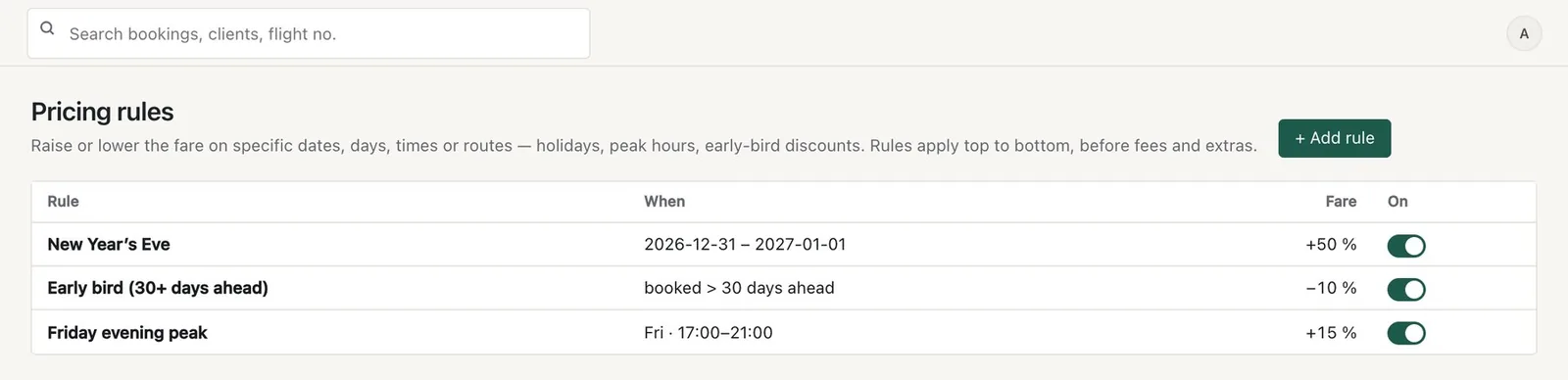
- Pricing rules by date, weekday, time, lead time, distance or zone
- Night, weekend, airport and extra-stop fees; extras; promo codes
- Return discount, tax included or added, tips, card fee and rounding
Draw zones as circles or custom shapes on the map and mark airports, so airport fees apply to any address inside them. When zones overlap the smallest one wins, so a terminal can sit inside a wider airport area.
Pricing rules handle the real calendar: plus 50% on New Year's Eve, minus 10% for bookings made 30 days ahead, plus 15% on Friday evenings. The live preview on the Rates screen shows what a test trip costs before you save.

Payments
Get paid your way, with no commission to us
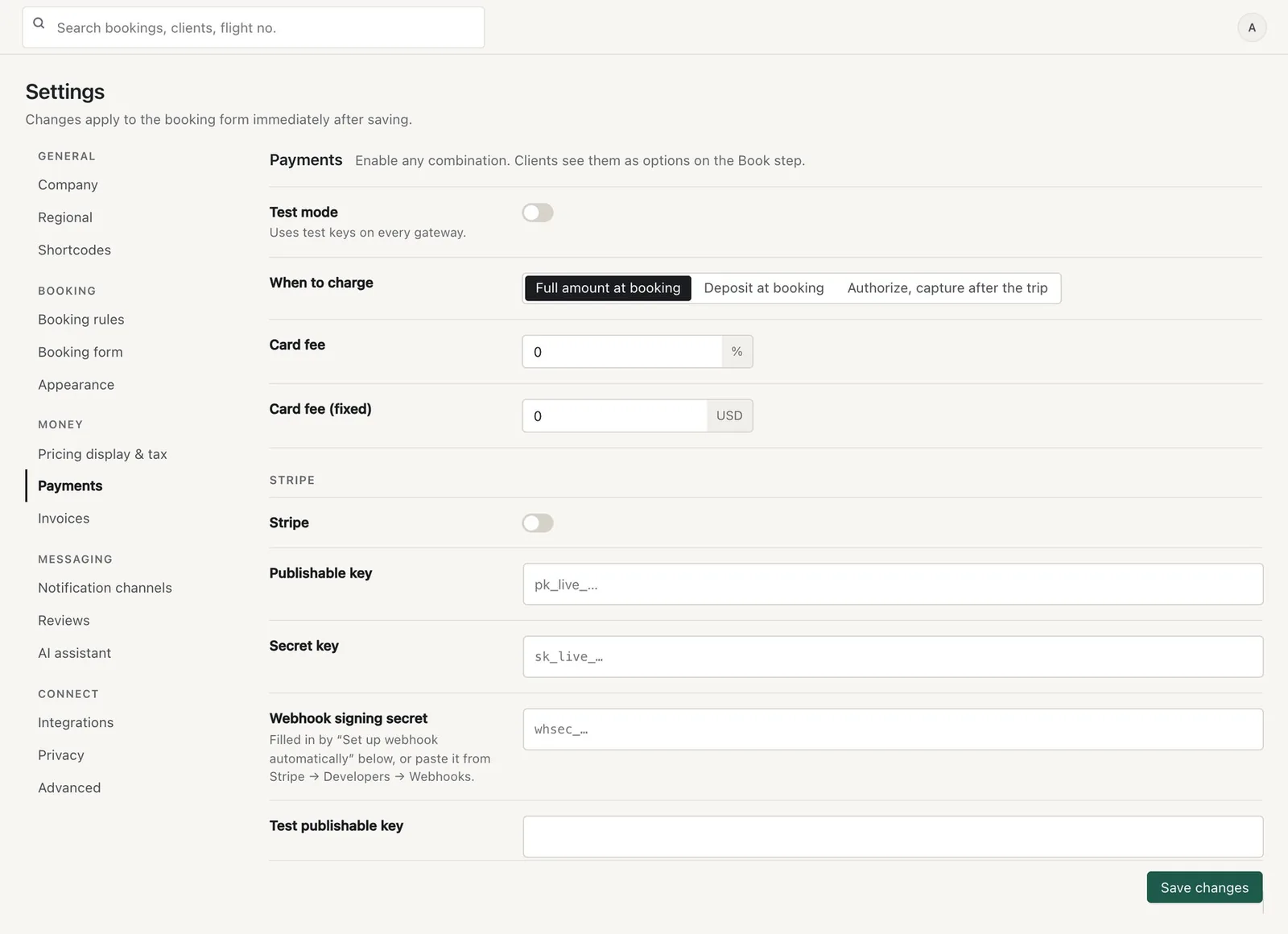
Connect Stripe, Square, PayPal or Mollie in minutes, or take cash on pickup. Charge in full, take a deposit, or hold the amount and charge after the trip.
- Stripe: cards, Apple Pay, Google Pay and local methods; save cards for later charges
- Square, PayPal and Mollie (iDEAL, Bancontact and more)
- Cash on pickup, company account and quote requests
- One-click webhook setup for Stripe, Square and PayPal
- Automatic refunds inside your free-cancellation window
- Waiting time, parking and tolls collected after the trip
Money goes straight from your client to your own payment account. Test mode with test keys lets you try everything before going live, and test and live keep separate settings.
Unpaid online bookings release themselves after one hour, so an abandoned payment never blocks a car.
AI assistant
A website assistant that quotes real prices and books
A chat button that answers questions about your company, gives prices straight from your pricing engine, and takes bookings. The visitor confirms before anything is booked.
- Prices only from your rates, never guessed
- Books in the chat and continues to your secure payment page
- Answers booking status questions with the reference
- Hands over to your team by email and Telegram
- Daily spending cap and rate limits
- Learns from questions it could not answer
It runs on Claude with your own Anthropic API key, so usage is billed to your account and you choose the model. It stays on topic and declines anything that is not about your company.
Run the day
Bookings and quotes
Every trip, quote and payment in one drawer
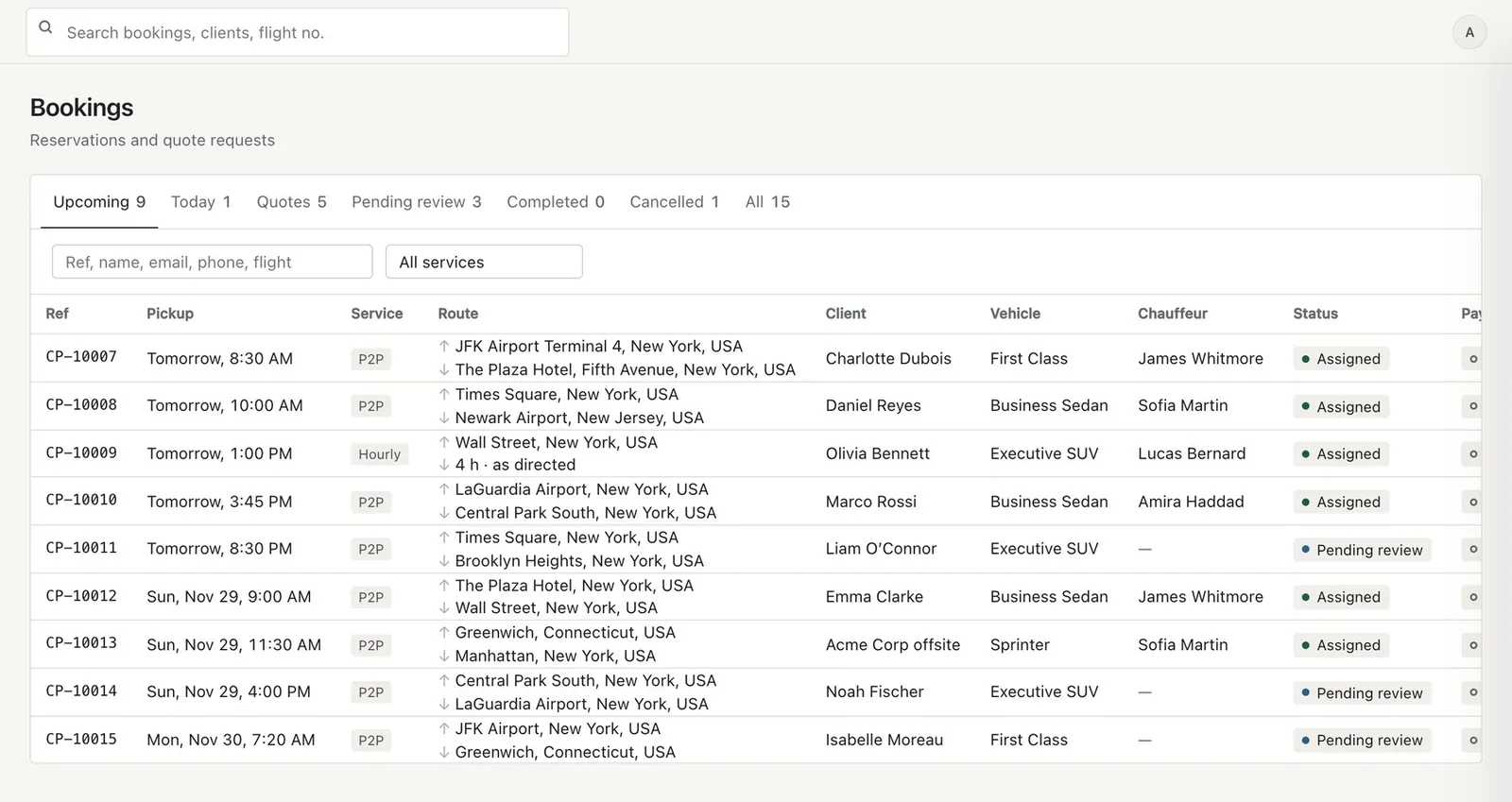
Filter upcoming trips, quotes and trips waiting for review. Click one to confirm it, assign a chauffeur and car, price a quote, take cash or refund.
- Statuses from quote request to completed, cancelled or no-show
- Price quote requests; clients approve and pay from the email
- Charges after the trip: waiting, parking and tolls, then Collect
- Internal notes, full timeline and price breakdown
- Free cancellation window you set; clients cancel from their account
Short-notice trips and addresses outside your service area become quote requests instead of instant bookings, so you stay in control of the jobs that need a human decision.

Dispatch board
Dispatch by drag and drop
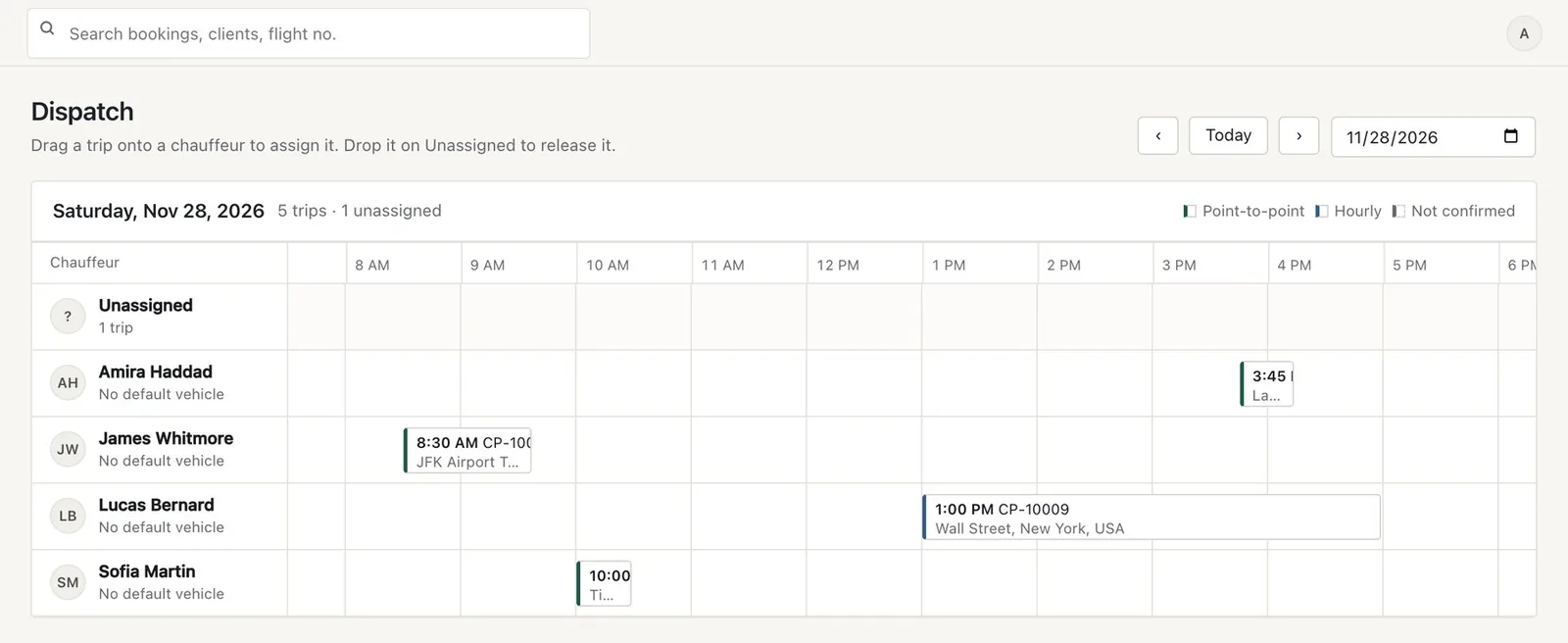
One row per chauffeur, the day on a timeline. Drag a trip onto a chauffeur to assign it. Overlapping trips, too little time between jobs and time off are flagged before they become a problem.
- Point-to-point, hourly and unconfirmed trips at a glance
- Conflict checks you can override when you know better
- Licence expiry flagged on the board
- Farmed-out jobs get their own lane
Chauffeurs have profiles with licence details, time off and pay: a percentage of the fare, an hourly rate or a fixed amount per trip. Payouts are calculated for you in Reports.

Driver app
A driver app your chauffeurs will actually use
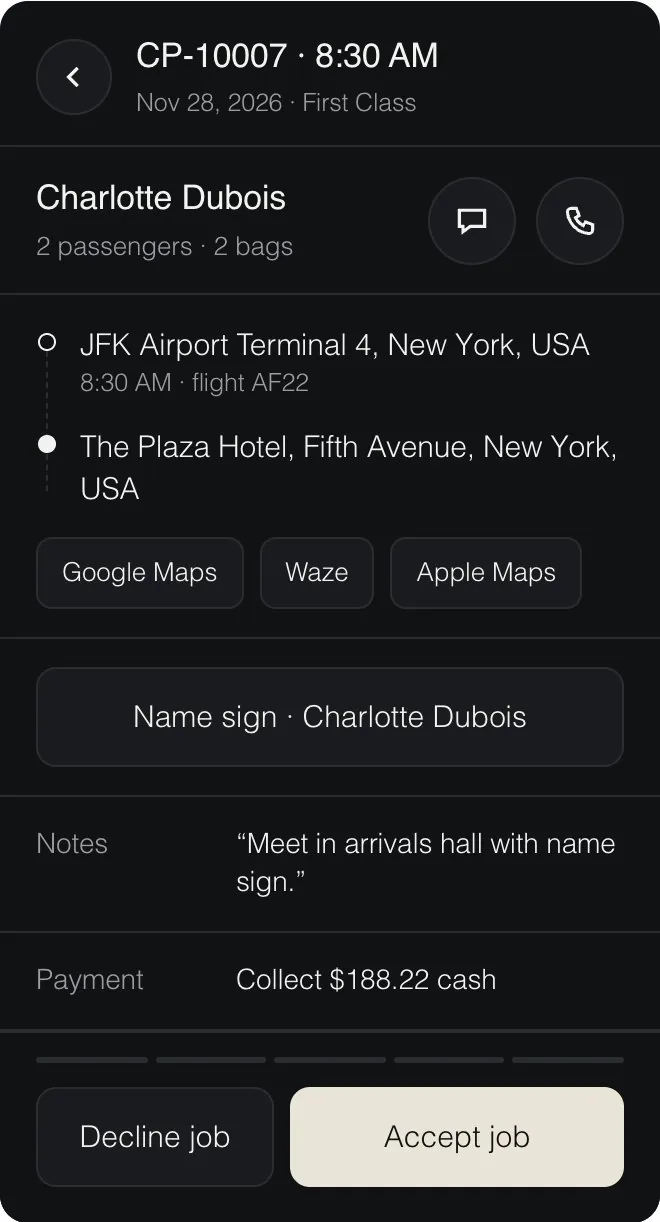
Chauffeurs open their jobs on their phone, add the app to the home screen, and tap through each trip. No app store, no passwords.
- Today, upcoming and done, with cash to collect
- Navigation in Google Maps, Waze or Apple Maps
- Call or text the passenger
- Full-screen name sign with your logo
- On my way, Arrived, On board, Complete
- Waiting time, parking and tolls entered at the end
Tapping On my way sends your client a tracking link showing the chauffeur, the car, an estimated arrival time and the car on a map. Location is only shared while the chauffeur is on the way or waiting, never once the passenger is on board.

Flight tracking
Airport pickups that follow the flight
For airport transfers the system watches the client's flight and moves the pickup when it lands late, until the chauffeur sets off. Cancelled and diverted flights are flagged in red.
- Checks the day before, then more often as landing approaches
- Moves the pickup from the original booked time, never drifts
- Terminal, gate and baggage belt in the booking and driver app
- Delay alerts by email, SMS and Telegram
Flight data comes from AeroDataBox through RapidAPI or API.market, on your own subscription. Clients flying out are watched, never moved.
Notifications
The right message to the right person, automatically
New booking, confirmed, quote sent, chauffeur assigned, on the way, arrived, reminder, completed, cancelled. Choose who hears about what and on which channel.
- Email through WordPress or Resend
- SMS through Telnyx or Vonage
- WhatsApp through Kapso with Meta-approved templates
- Telegram for your dispatch group
- Edit every message with one-click merge tags
- Delivery log with resend for failed texts
Each booking remembers its language, so later emails to that client arrive in the language they booked in.

Grow the business
Company accounts and invoices
Corporate clients on one invoice a month
Staff from a client company are recognised by their email domain, see the company rate and book on account. On the 1st of each month every company receives one invoice for last month's trips.
- Company discount, PO numbers and cost centres
- Numbered PDF invoices, without gaps, per year
- Receipts for paid bookings, supplementary invoices for extras
- Mark paid, void or resend from the Invoices screen
Seller details, VAT or tax ID and logo come from your company settings. Start numbering where your old system stopped.

Farm out
Never turn a job away
When you're fully booked or a trip is outside your area, pass it to an operator you trust. They get a private job page with no account needed, and your client still gets your messages.
- Choose what you pay the partner and see your margin
- Partner accepts, adds their chauffeur and car, and updates the trip
- Take back at any time
- Monthly totals of what you owe each partner
Reviews
More five-star reviews, fewer public surprises
A few hours after the trip, clients rate it privately. Happy clients are invited to post on Google or Tripadvisor with their comment ready to paste; low ratings stay private and alert you.
- Average, response rate and ratings per chauffeur
- Regular clients asked at most once in the days you set
Reports
Know which routes and cars make money
Revenue and bookings over time, by service, vehicle class, payment and source, top routes, the quote funnel and chauffeur payouts. Export bookings or payouts as CSV for your accountant.
- Chauffeur earnings from each pay setting, tips and cash kept
- Conversion tracking for Google Ads, GA4 and Meta

Languages and privacy
Seven languages and GDPR built in
The booking form, client pages and client emails in English, Spanish, German, Dutch, Portuguese, Italian or French. Each booking remembers its language.
- Works with WPML and Polylang
- Export and erase personal data; automatic retention
- Your data stays in your own WordPress database
What is a chauffeur booking system?
A chauffeur booking system lets clients get a price and book a car service online, and lets the operator manage those bookings, assign chauffeurs, take payments and send confirmations. Chauffeur Plugin does all of this inside your own WordPress website.
Does Chauffeur Plugin include dispatch software?
Yes. It has a drag-and-drop dispatch board with conflict checks, chauffeur profiles with pay settings, and a driver app your chauffeurs open on their phone. You can also farm out jobs to partner operators.
Can it handle airport transfers?
Yes. It tracks flights and moves the pickup when a flight lands late, supports fixed airport routes and airport fees, shows a full-screen name sign in the driver app, and offers airports as Popular locations in every address field.
Which payment gateways are supported?
Stripe (cards, Apple Pay, Google Pay), Square, PayPal and Mollie, plus cash on pickup, company accounts and quote requests. Webhooks for Stripe, Square and PayPal are set up with one click.
Do I need a Google Maps key?
Yes, for live distances and address suggestions. A server key (Routes and Geocoding APIs) calculates prices and a browser key (Maps JavaScript and Places) suggests addresses. The setup guide walks you through both.
Does it work with my theme and Elementor?
Yes. The forms are available as blocks, Elementor widgets and shortcodes, inherit your theme's font and are protected from theme styles that would break the layout.
See it on your own website
Try every feature free for 14 days. No card needed, no commission on your bookings, ever.